


Introduction
Retail businesses today face increasing pressure to deliver fast, accurate, and seamless customer experiences. Efficient checkout processes, precise inventory management, and reliable sales tracking are essential for maintaining competitiveness. One of the most effective tools that retailers use to achieve these goals is a point-of-sale (POS) system. Among the available options, desktop POS machines have emerged as a reliable choice for brick-and-mortar stores seeking efficiency and operational excellence.
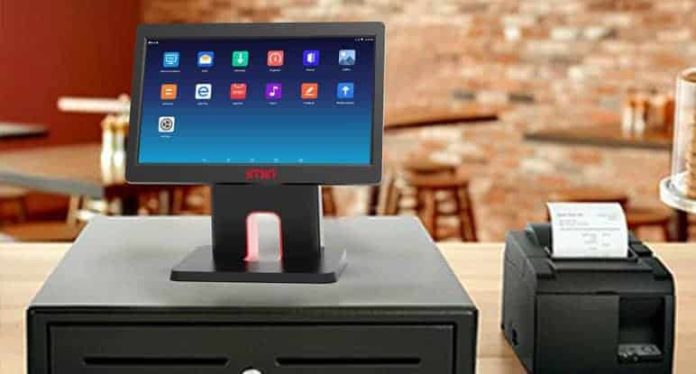
A desktop POS system combines hardware components such as a computer terminal, barcode scanner, receipt printer, and cash drawer with specialized software that manages transactions, inventory, and reporting. Many retailers choose a Desktop POS Machine because it provides a stable, powerful, and scalable solution capable of handling high-volume sales while supporting business growth. The integration of these functions allows retailers to operate more efficiently and provide better service to their customers.
Faster and More Efficient Checkout
One of the primary advantages of installing a desktop POS machine is the significant improvement in checkout speed. Unlike traditional cash registers or manual billing systems, a desktop POS system automates calculations, applies discounts, and processes multiple payment methods quickly. Barcode scanning reduces human error and allows cashiers to process large orders in seconds, minimizing customer wait times.
Faster checkout not only improves customer satisfaction but also increases overall sales capacity. During peak hours, retailers can manage longer lines efficiently, reducing congestion and creating a smoother shopping experience. By optimizing transaction speed, stores can serve more customers in less time, directly impacting revenue and customer loyalty.
Accurate Inventory Management
Another major benefit of desktop POS machines is real-time inventory tracking. Every sale processed through the system automatically updates stock levels, reducing the risk of stockouts or overstocking. Retailers can monitor product availability, generate reorder alerts, and manage multiple categories of inventory from a single interface. This accurate inventory management enables businesses to make data-driven purchasing decisions, optimize storage, and prevent losses due to expired or misplaced items.
Desktop POS systems often offer advanced features such as product categorization, bulk updates, and integration with suppliers. These capabilities help retailers maintain organized inventory records and ensure that popular items are always available, which enhances customer satisfaction and encourages repeat purchases.
Enhanced Reporting and Analytics
Desktop POS machines provide detailed reporting and analytics that help retailers understand their business performance. Sales reports, transaction histories, and customer data allow store owners to identify trends, track peak hours, and evaluate the success of promotions. Access to real-time data ensures that managers can make informed decisions quickly, whether it involves adjusting pricing, launching marketing campaigns, or reallocating resources to meet customer demand.
Analytical insights also help retailers identify underperforming products and make necessary adjustments to improve profitability. With comprehensive reporting features, businesses gain greater control over operations and can implement strategies that boost efficiency and sales performance.
Improved Customer Experience
A smooth and efficient checkout process directly contributes to a better customer experience. Desktop POS machines reduce waiting times, minimize errors in billing, and provide flexible payment options, including credit cards, debit cards, and digital wallets. Some systems also support loyalty programs, gift cards, and personalized promotions, which enhance engagement and encourage repeat visits.
Additionally, customer-facing displays on desktop POS setups can show itemized bills, promotions, and totals in real time, providing transparency and building trust. By combining speed, accuracy, and convenience, desktop POS machines help retailers foster long-term customer relationships.
Employee Productivity and Management
Desktop POS systems improve employee efficiency by streamlining repetitive tasks such as billing, inventory tracking, and report generation. Employees can focus more on customer service rather than manual data entry or calculation errors. Some systems also offer employee management features, including role-based access, sales performance tracking, and attendance monitoring. This functionality ensures accountability and allows managers to identify top performers and areas for improvement.
Scalability and Integration
As retail businesses grow, their technology needs evolve. Desktop POS machines are highly scalable, supporting additional registers, software upgrades, and integration with e-commerce platforms, accounting tools, and other business systems. This flexibility allows retailers to expand operations without replacing the entire POS setup, ensuring that the investment remains valuable over time.
Conclusion
Installing a desktop POS machine in retail environments offers numerous advantages, from faster checkouts and accurate inventory management to enhanced reporting and improved customer experiences. These systems provide a comprehensive solution that supports both day-to-day operations and long-term business growth.
Retailers who invest in desktop POS machines benefit from increased efficiency, reduced errors, and better insights into business performance. By streamlining transactions, tracking inventory in real time, and enabling data-driven decisions, these systems empower stores to operate more effectively and deliver superior service to their customers. For businesses aiming to enhance operational efficiency and customer satisfaction, a desktop POS machine is an essential tool that offers both immediate benefits and long-term value.